klingondragon
9 years ago
Since acidbrain got it to work, May I have that copy of the files to check if that works? (You may have packaged them differently and that may be the problem.
Kvantovy
  • Kvantovy
  • 50.25% (Neutral)
  • Private Topic Starter
9 years ago

NVBtMstrNG.W3D


In my ChinaVehicle.ini it's without the "NG". It came out totally invisible when built oO
klingondragon
9 years ago
I checked the file name in W3DZH.big
I thought they were the same as the inis (save for the '.w3d' file extension).
Kvantovy
  • Kvantovy
  • 50.25% (Neutral)
  • Private Topic Starter
9 years ago
GUYS! IT WORKS! But I'm not fully sure why :D
https://scr.hu/MeXqL2 

Ok, I'm not exacly sure, but thats what happened:
I renamed stuff to battlemaster name klingondragon posted, and battlemaster was built looking like in vanilla ZH.
I then renamed stuff to the name I posted above, and it was build completely invisible.
I then renamed stuff to avleopard again, and it came out invisible for USA too.
I then deleted all added files to import clear copies, and I forgot to change the names of textures to avleopard (they were called zbajerowane.png when I was modeling the tank in Blender and probably when I was testing textures in gmax too).

And it works 😃

So, the name of the texture file is determined by what? By the name of the texture we put on the model in gmax?
klingondragon
9 years ago
Obviously.
gmax's W3D has got an entry in it which says (In human): 'Go to Art/Textures/ and find the file called 'texture name here' and apply that to this model'. (I don't use the program but how is it going to guess what texture you use, It must use the filename you provide. In the future I would suggest putting your texture in the correct directory before applying it to the model)

Not related to the installation stuff, but:
That block of colour (for factioncolor) is a bit unsightly. I would like it if the faction colour were less a block and more part of the design of the tank. (work it into the bodywork more).
Just a suggestion for the future.
acidbrain
9 years ago


So, the name of the texture file is determined by what? By the name of the texture we put on the model in gmax?

Originally Posted by: Kvantovy 


Yip, the texture you apply to the model has to be in the gameroot otherwise you get a pink panther...:P
In gmax/renx you can go to Modify/Modifier List/Unwrap UVW/Edit/Pick texture(right upper corner)/Applied(radiobuttons)..There you can see what texture is applied to the selected object.
You can alo check which textures are applied in File/Summary info, here you see a list with all the objects from the model and the applied textures...
Panem et kirkinses
Kvantovy
  • Kvantovy
  • 50.25% (Neutral)
  • Private Topic Starter
9 years ago
Welp, that's another important thing to remember 😃
I wonder, though, why it worked anyway on acidbrain ZH. Did you reexport it from gmax?

Anyway, thank you both very much, for your help!

The HOUSECOLOR was added only to check if it works, I had no clue where to put it.
The Tank itself (the textures) comes from strategy/simulation game Hostile Waters (2001), one of my favourite games of all time. I wanted to recreate it in ZH. In HW it appears only as an enemy vehicle (and in one mission as an ally, when that faction is helping you), but you cannot control it yourself. But now I can! Whole army of them in fact! 😃
klingondragon
9 years ago
May I suggest putting the faction colour around the rim of the turret (as a broken line (I feel a solid line wouldn't look right))
acidbrain
9 years ago

Welp, that's another important thing to remember 😃
I wonder, though, why it worked anyway on acidbrain ZH. Did you reexport it from gmax?

Originally Posted by: Kvantovy 


At first i took your original files, i only made a tga file from your png file, later i exported it again for a new model name and that worked too.


Panem et kirkinses
acidbrain
9 years ago
Hey Kvantovy, added a muzzleflash for ya...

UserPostedImage

Here are the settings for gmax/renx in case you need them...
UserPostedImage

I attached a rar with the W3D model and the gmax file so you can also check out or change the settings on the model...

Greetz...😎   TankWithMuzzleFlash.rar (25kb) downloaded 32 time(s).
Panem et kirkinses
klingondragon
9 years ago
It did that fine for me when it was pink. It didn't need anything adding.
acidbrain
9 years ago

It did that fine for me when it was pink. It didn't need anything adding.

Originally Posted by: klingondragon 


This is the tank that was uploaded, no muzzleflash as you can see, so tell me how can this model ever show a muzzleflash in game?
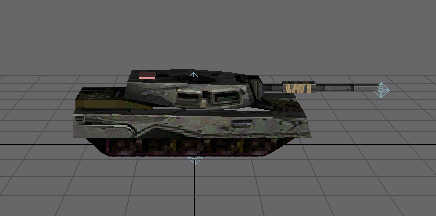
UserPostedImage

Here is the model i renamed with added muzzleflash...
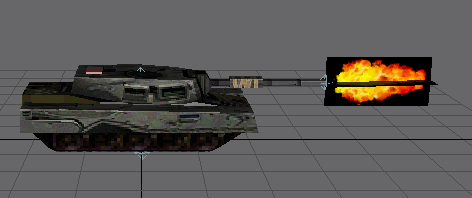
UserPostedImage

Check out the upper model, there is a helper called TurretMS at the end of the barrel,
now look at the code->WeaponFireFXBone = PRIMARY TurretMS
Now look at the bottom model, that muzzleflash is called TurretFX,
now look at the code-> WeaponMuzzleFlash = PRIMARY TurretFX...
See it now, two seperate things create the flash, an additive texture and FX which contains several particle systems...

Now take a look at the weapon from the crusader tank->Weapon = PRIMARY CrusaderTankGun.
Now take a look at the CrusaderTankGun in Weapon.ini->FireFX = WeaponFX_GenericTankGunNoTracer.
Now take a look at the WeaponFX in FXList.ini:

FXList WeaponFX_GenericTankGunNoTracer
  ViewShake 
    Type = NORMAL
  End
  LightPulse 
    Color = R:255 G:255 B:128 
    Radius = 15 
    IncreaseTime = 0 
    DecreaseTime = 500
  End
  ParticleSystem 
    Name = TankMuzzleFlashSmoke
    OrientToObject = Yes
  End
  ParticleSystem 
    Name = TankMuzzleFlashFlame
    OrientToObject = Yes
  End
  ParticleSystem 
    Name = TankMuzzleFlare
    OrientToObject = Yes
  End
  ParticleSystem 
    Name = TankMuzzleWave
    OrientToObject = Yes
    CreateAtGroundHeight = Yes
  End
End
You only saw the WeaponFX klingon, not the muzzleflash...

Maybe im wrong, install gmax/renx and check it out yourself...😎


It's quite hard to ride a bike when you have only seen it happen and didnt ride it yourself, you can talk about it but the experience just isnt there and the best teacher in life is experience...😉

some dude wrote:


Greetz
Panem et kirkinses
klingondragon
9 years ago
Just look at the screenshot. There was a flash when it fired.
acidbrain
9 years ago

Just look at the screenshot. There was a flash when it fired.

Originally Posted by: klingondragon 


I explained it to you in detail klingon, there was a flash but not the flash that was supposed to be there, just look at your screenshot and then at mine...
The model had no muzzleflash so it is just impossible to have a muzzleflash in game, your model had weaponfx but no muzzleflash...

Just look at the code:
WeaponFireFXBone = PRIMARY TurretMS
WeaponRecoilBone = PRIMARY Barrel
WeaponMuzzleFlash = PRIMARY TurretFX
WeaponLaunchBone = PRIMARY TurretMS

I don't have gmax.

Originally Posted by: klingondragon 


So basicly you are trying to say that you are right while you dont have the tools to check it out yourself, you are speaking to a experienced modeler here while you never made a model in your life yourself klingon, im really not in the mood to spend more time on this since it is very very hard to try to teach you something, you know it all...

Here are some detailed screenshots from gmax/renx
TURRETMS for FX and weaponlaunch
UserPostedImage

TURRETFX for the muzzleflash
UserPostedImage

When you place a crusader tank and the new tank in worldbuilder you see this:
UserPostedImage
When i place a crusader tank and the new tank in worldbuilder i see this:
UserPostedImage

End of discussion...


stubborn
[stuhb-ern]
adjective
1.
unreasonably obstinate; obstinately unmoving:
a stubborn child.
2.
fixed or set in purpose or opinion; resolute:
a stubborn opponent of foreign aid.
3.
obstinately maintained, as a course of action:
a stubborn resistance.
4.
difficult to manage or suppress:
a stubborn horse; a stubborn pain.
5.
hard, tough, or stiff, as stone or wood; difficult to shape or work.

The Dictionary wrote:


Im trying klingon, omg im trying but you are making it so hard, so hard...

Greetz
Panem et kirkinses
Kvantovy
  • Kvantovy
  • 50.25% (Neutral)
  • Private Topic Starter
9 years ago
Ok, thx for the additional information. I replicated the effect, though at first I had problems with black background appearing in game.

UserPostedImage
acidbrain
9 years ago
It is important that you export the helpers and muzzleflash with the right settings, you individualy set the settings and at the end you select all the objects and export.
Helpers
UserPostedImage

MuzzleFlash
UserPostedImage
Panem et kirkinses
acidbrain
9 years ago
Checked out your tank a bit more and found something that can be done better, the SMOKE01 helper is linked to the chassis, it should be linked to the turret.

I also added 2 threadfx helpers and put the threadfx helpers at the right place, added an extra SMOKE helper so you can use some extra particlesystems and such.
Added a FIREPOINT helper on the turret so you can attach a gattlingcannon to the turret, just for fun...
Played around with the model a bit and give it an OverlordTankDraw module...
UserPostedImage
I attached a gattling, you can attach anything you want...
I attached the W3D and the gmax files so you can check them out...   NewTankStuff.rar (26kb) downloaded 33 time(s).
Panem et kirkinses
