bel3ve
  • bel3ve
  • 100% (Exalted)
  • Major Topic Starter
17 years ago
I'm trying to make a grand canyon type map but when I try to texture the 80-90 degree cliffs I get a good picture like this. Any way to make a Really Steep Cliff look good?
hhh.jpg

Click to View Image103 View(s)


UserPostedImage
Sponsor
Drummin
17 years ago
Try smoothing out the sides with your feather brush with the filter set at 1. This should help the textures lay down better. Looking pretty good though.
bel3ve
  • bel3ve
  • 100% (Exalted)
  • Major Topic Starter
17 years ago
I have tried that but then it makes my "Cliff" more like a smooth depression.
UserPostedImage
bel3ve
  • bel3ve
  • 100% (Exalted)
  • Major Topic Starter
17 years ago
2 Things.
1. Is there a bridge that will stretch across a 200 unit drop and still have its bases still touching the bottom.
2. I tried the smooth thing and it made the textures better but now its more like a smooth hill, any way to make it steeper while still making it look good?
Cliff.jpg

Click to View Image89 View(s)


UserPostedImage
Drummin
17 years ago
IronSectionalDoublewide and IronSectionalDoublewide2 are the only bridges I know of offhand that will be supported at that height.

If the setting are right on your feather brush the slope shouldn't change that much. I'd use a wider brush than what you've shown in your first image. It should span over a larger area of the cliff face itself filling in the low spots and knocking down the high areas. If the tool drops down to the ground surface though (or over the top), it will melt away the cliff as it tries to find common ground between these two surfaces. Stay on the face.
FatalSwoop
17 years ago
Lets se if I can explain this one

Firstly ‘Raise’ the brush height to ‘say’ 200 with a width of 30, make a rough layout of the mountain section you want, then lower the brush height back down to ground level and take away the edges of the first raised section,

Raise first! then sculpt shape with a lower (ground level) brush height

What I’ve done in this picture is? first raise the mountain section to a height of 200, plotted out a ‘C’ shape,
And then lowered the brush height back down to ground level ( or the next sections height) then gave the edges a smooth mountain cliff like finish,,
Also always use ‘lock angle tool‘,, It raises the map evenly within its wire frame, using Worldbuilder without it gives your map a smudged and unparalleled look like home made!

I may not have been able to explain properly but if this aids you,, then gut, if not you could just tell me what bit you didn’t get,,

Also get some ‘camera angles’ on your shots cant distinguish the mountains feathers get some shadows in there,,


FS XV// 023
Steep Cliffs.jpg

Click to View Image71 View(s)


TECstar operates within the shadow of FatalSwoop!! Making its tactical line up highly Fatal and oh so Swooping,,,

FaTalSwoop XV// 003

Real time tag,. made on location at Fallen Empire... destroyed 2 GLA armies using 9 ground units ( no loses )and a constant bombardment of Air,,,,
Turret Wars Line
17 years ago
My method is different,
First I make a plateau, around more than 80 would do, lower the edges, then raise them again to make a crisp edge. I also make higher plateaus on the lower ones to make them have some cliff slopes or flat edges.
1.JPG

Click to View Image67 View(s)


UserPostedImage
Drummin
17 years ago
Nice cliffs to you both... different, but both are good depending on the look you're going for.

Fatalswoop - I thought that "Lock Angle" locks your tool along an X or Y axis. I find it interesting that you used it for a curve and you use it all the time. I'll have to look into that.
FatalSwoop
17 years ago
I found the usual way of making mountains, was not give me the kind of finish I wanted,,

Which was, to just, raise the land in a scattering of moulds, and work around them,,
Nah! I found they were raising too much surrounding land, and looked like jelly moulding with no proper ridges,,,

So I devised my own method! which is, to raise the bulk section of the mountain first and then sculpt its shape with a lower brush setting,

Also the lock angle tool does keep the pointer in the x and y axis, making it impossible to draw a cured line or moulding in one shot, has to be done bit by bit with a touch of patients,

What it does outside of this, is raise each section of land to a central position on the wireframe which does look better and I feel is more program friendly if the wireframe’s got anything to do with it,,,

Below is my method of making mountains the TX way with proper ridges,

FS XV// 023
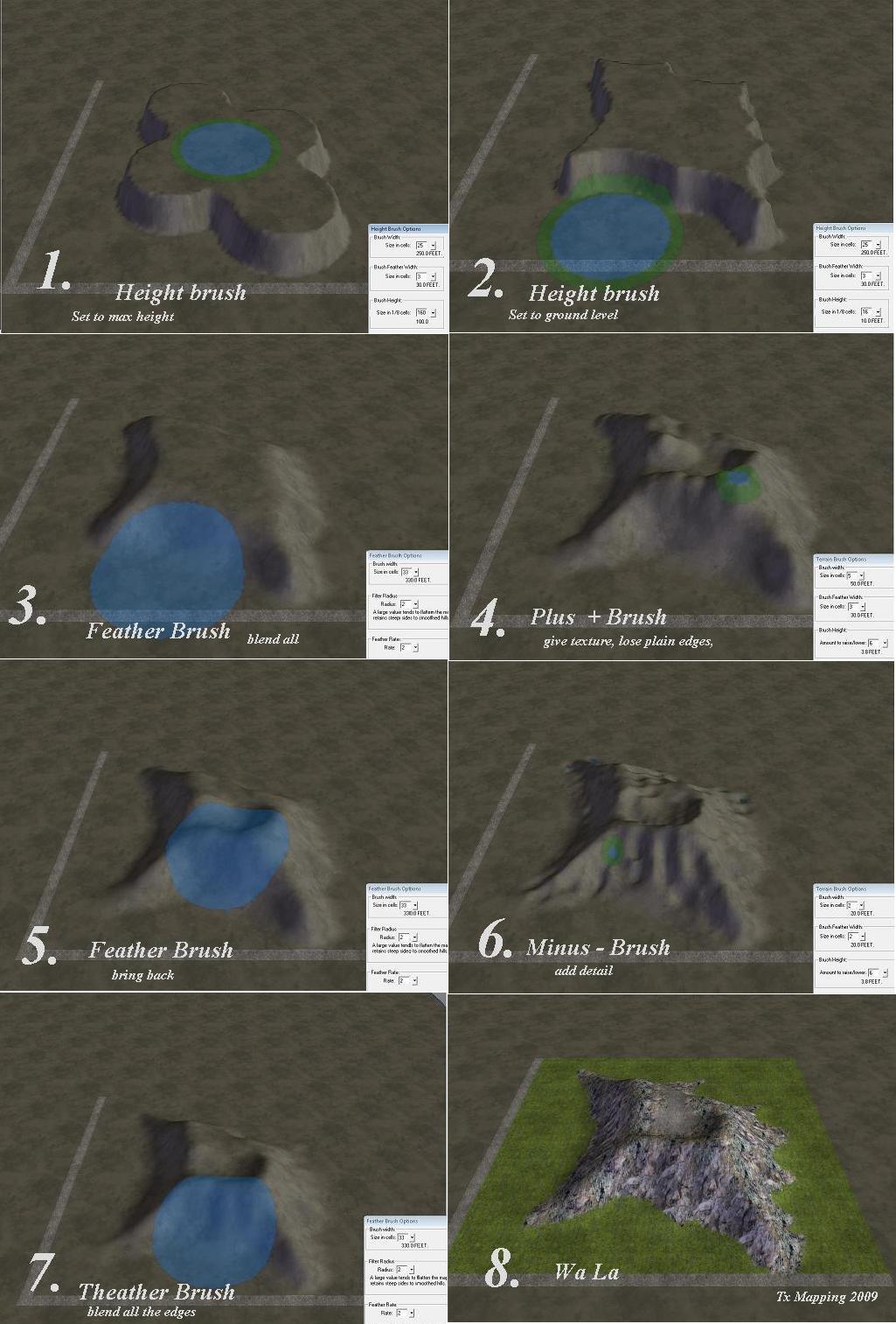
Tx Mountains Sculpting.jpg

Click to View Image47 View(s)


TECstar operates within the shadow of FatalSwoop!! Making its tactical line up highly Fatal and oh so Swooping,,,

FaTalSwoop XV// 003

Real time tag,. made on location at Fallen Empire... destroyed 2 GLA armies using 9 ground units ( no loses )and a constant bombardment of Air,,,,

paimail
17 years ago
i'm back!

uhm anyway take a look at my cliff tutorial:
http://www.cnclabs.com/maps/generals/worldbuilder/tutorials/how-to-make-professional-cliffs.aspx 

atleast that's how the "Real" cliffs in the campaign and oficial skirmish maps are made 😄
UserPostedImage