This tutorial will explain how to make a sound in the proper format and how to add that sound to c&c generals. This tutorial does NOT cover adding custom music tracks to the game. Although the steps are similar in some ways.
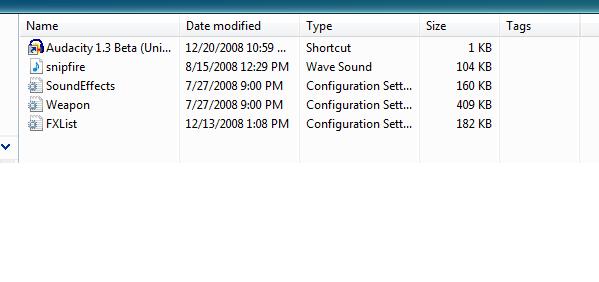
-See Pic One-
First you will need a sound program like
audacity to convert the wave file to the proper bit rate and / or format.
The other files you will need are your sound, and these .ini files SoundEffects.ini Weapon.ini and FXlist.ini.
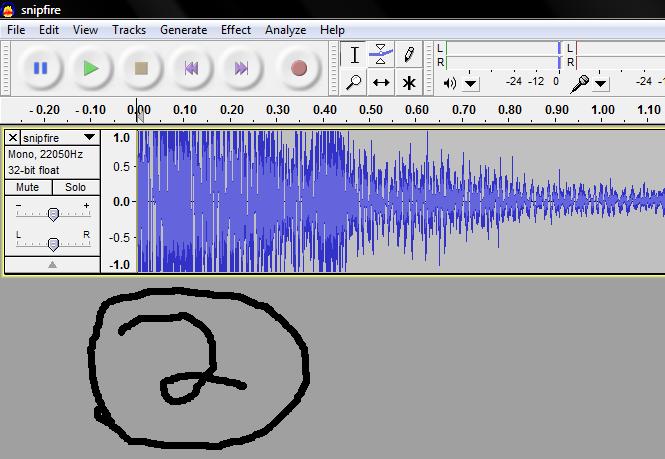
-See Pic Two-
Open up audacity and then open up your sound file using the file open tab!
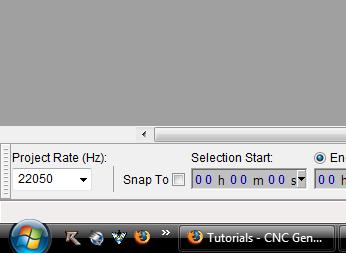
-See Pic Three-
Now make sure the bottom left tab says Project Rate 22050 Because most other rates WILL NOT WORK!!!!!
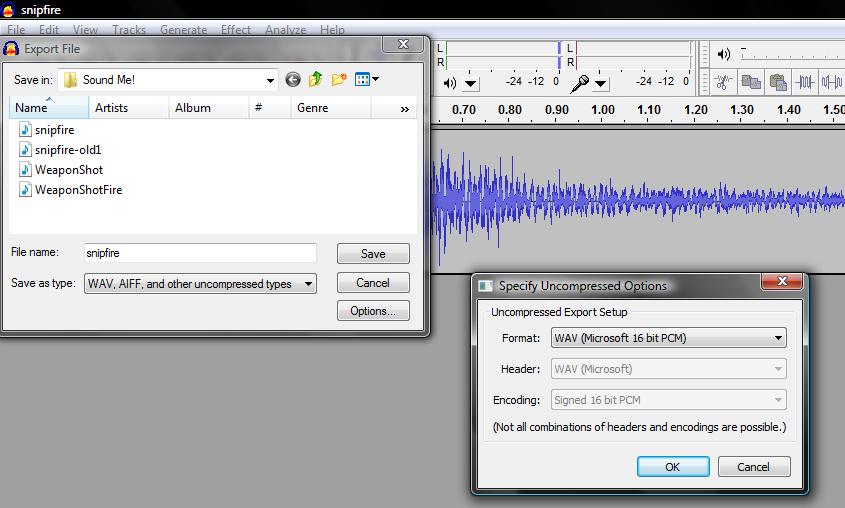
-See Pic Four-
Now go to the Menu Tab and Click the Export Button And then Click WAV AIFF and other uncompressed types. Then Click Options and Then Click WAV (Microsoft 16 bit PCM)
Now to set up a sound effect sound you need to open up soundeffects.ini and then copy a simple sound code, pase it, rename the header to something unique and easy (I will use SSFire) Then you will have to identify the sound as the sound you made earlier.
;USE ME!!!!!!!!!!!!!!!!!!!!!!!!!!!!!!!!!!!!!!!!!!!!!!!!!!!!
AudioEvent SSFire
  Sounds      = WeaponShotFire
  Control     = interrupt random
  Priority    = low
  Limit       = 2
  PitchShift  = -10  10
  VolumeShift = -20
  Volume      = 90
  LowPassCutoff = 50
  Type        = world shrouded everyone
End
;EXAMPLE!!!!!!!!!!!!!!!!!!!!!!!!!!!!!!!!!!!!
Final Step Applying your sound!
To apply your sound either use a weaponFX (FXlist) to add your sound, a ProjectileDetonationFX(FXList) or a FireSound (Weapon)
All of these use the Weapon.ini to show what weapon plays the sound or what detonation plays the sound.
Weapon MarauderTankGun
  PrimaryDamage = 60.0
  PrimaryDamageRadius = 5.0
  ScatterRadiusVsInfantry = 10.0     ;When this weapon is used against infantry, it can randomly miss by as much as this distance.
  AttackRange = 170.0
  MinTargetPitch = -15                         ; we may not target anything outside of this pitch range
  MaxTargetPitch = 15                          ; ditto
  DamageType = ARMOR_PIERCING
  DeathType = NORMAL
  WeaponSpeed = 300                           ; dist/sec
  WeaponRecoil = 10
  ProjectileObject = MarauderTankShell
  FireFX = WeaponFX_GenericTankGunNoTracer ; ADD FX SOUND HERE---ex. FXYourSound----------------
  VeterancyFireFX         = HEROIC WeaponFX_HeroicGenericTankGunNoTracer
  ProjectileDetonationFX = WeaponFX_GenericTankShellDetonation ; ADD FX SOUND HERE ---- ex. FXYourSound-------
  FireSound = MarauderTankWeapon ;ADD SOUND NAME HERE!!!! ex. FireSound = SSFire.--------------------
  RadiusDamageAffects = ALLIES ENEMIES NEUTRALS
  DelayBetweenShots = 2000        ; time between shots, msec
  ClipSize = 0                    ; how many shots in a Clip (0 == infinite)
  ClipReloadTime = 0              ; how long to reload a Clip, msec

  ; note, these only apply to units that aren't the explicit target
  ; (ie, units that just happen to "get in the way"... projectiles
  ; always collide with the Designated Target, regardless of these flags
  ProjectileCollidesWith = STRUCTURES WALLS

End
FXList FXYourSound
  Sound
    Name = SSFire
  End
End
Click to View Image45 View(s)
Click to View Image49 View(s)
Click to View Image44 View(s)
Click to View Image52 View(s)
