There could be a number of reasons this isn't working so I will just show the ways to make civilians walk the path.
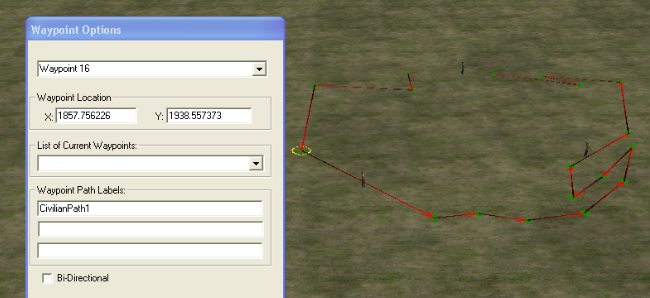
*First you need to lay down your pathway: Using the pathway tool, place your first point and left click and hold down your mouse button as you drag it to the next location. Continue your pathway until you make a loop.
*Name your pathway:It's important that you name the path using the "Waypoint Path Label:" textbox. See image below.
*Place and name your units:Place your units on the map and either name each unit or use the team name explained in the next step.
*Using a team instead of named units:If you would rather use a team name for all your wandering units you would do the following. After adding the skirmish players to the map, create a new player by clicking Edit/Edit Player List.
(I added a player called "Walkers" in this example.)
When placing units on the map you then assign them to the team called "teamWalkers".
*Scripting for named units:In the plyrcivilian folder you would create a script like this.
*** IF ***
    True.
*** THEN ***
   Unit 'Civilian1' follows waypoints, beginning at Waypoint Path 'CivilianPath1'
   Unit 'Civilian2' follows waypoints, beginning at Waypoint Path 'CivilianPath1'
   Unit 'Civilian3' follows waypoints, beginning at Waypoint Path 'CivilianPath1'
*** IF ***
    True.
*** THEN ***
  Have Team 'teamWalkers' wander along Waypoint Path 'CivilianPath1'
If you were planning on having a number of different pathways I would use the "Named Unit" method.
Click to View Image96 View(s)
Edited by user
17 years ago |
Reason: Not specified